Whether you manage one or multiple IG accounts, scheduling posts on Instagram will save you from worrying about what to post on the go and help you focus on the most important aspects of your business. No more last-minute panic attacks trying to whip up a post, just...
Redesign For multi-location brands
all your locations, one content flow
For multi-brand companies
content collaboration at scale
For agencies
impress your clients and take on more
“The team loved it from the start. Planable helps us overview the entire marketing efforts.“
If your team is still managing content in spreadsheets or handling multiple planning tools to get one post approved, more hustle won’t solve a content workflow problem. For agencies and multi-brand marketing teams, a broken workflow compounds fast: missed deadlines, approval bottlenecks, and no single source of truth across channels.
I’ve spent over a decade in SaaS content and social media management, and evaluated the best content planning software. Every tool in this list was evaluated on five factors: onboarding speed, approval workflows, content breadth beyond social, real-time collaboration, and calendar visibility.
If you’re a creative director, agency lead, or multi-location brand marketer who needs visibility across content operations without micromanaging every moving part, this guide was written for you.
Best content planning platforms in 2026 at a glance
Tool
Ideal for
Standout feature
1. Planable
Agencies & multi-brand teams
Structured, role-based content approval workflows with real-time collaboration
2. SocialBee
Social-first marketers
AI-assisted posting with category-based content recycling
3. Notion
Small teams & individuals
Highly flexible workspace combining docs, databases, and editorial calendars
4. ProofHub
Marketing teams managing complex projects
Built-in proofing and multi-level approvals inside a project management system
5. Teamwork
Agencies managing client projects
Native time tracking, invoicing, and client access alongside task management
6. CoSchedule
Small in-house marketing teams
Unified marketing calendar for blogs, social posts, and campaigns
7. Brafton
Content marketing teams focused on ROI
End-to-end content campaign management with SEO performance dashboards
8. Brandwatch
Enterprise brands & analysts
Advanced social listening and audience intelligence for data-driven content strategy
9. Content Snare
Agencies collecting materials from clients
Structured content intake workflows with automated reminders
10. SE Ranking
SEO-driven content teams
Integrated keyword research, content optimization, and AI search visibility tracking
1. Planable
Ideal for
Agencies & multi-brand teams
Standout feature
Structured, role-based content approval workflows with real-time collaboration
2. SocialBee
Ideal for
Social-first marketers
Standout feature
AI-assisted posting with category-based content recycling
3. Notion
Ideal for
Small teams & individuals
Standout feature
Highly flexible workspace combining docs, databases, and editorial calendars
4. ProofHub
Ideal for
Marketing teams managing complex projects
Standout feature
Built-in proofing and multi-level approvals inside a project management system
5. Teamwork
Ideal for
Agencies managing client projects
Standout feature
Native time tracking, invoicing, and client access alongside task management
6. CoSchedule
Ideal for
Small in-house marketing teams
Standout feature
Unified marketing calendar for blogs, social posts, and campaigns
7. Brafton
Ideal for
Content marketing teams focused on ROI
Standout feature
End-to-end content campaign management with SEO performance dashboards
8. Brandwatch
Ideal for
Enterprise brands & analysts
Standout feature
Advanced social listening and audience intelligence for data-driven content strategy
9. Content Snare
Ideal for
Agencies collecting materials from clients
Standout feature
Structured content intake workflows with automated reminders
10. SE Ranking
Ideal for
SEO-driven content teams
Standout feature
Integrated keyword research, content optimization, and AI search visibility tracking
How we evaluated these social media content planning tools
Every tool was assessed using the criteria that matter most for agencies, in-house teams, and brands managing content at scale:
Usability (onboarding speed): How quickly can a full team set up, learn the workflow, and start planning and publishing?
Approval workflows: Does it support structured feedback and sign-off (roles, permissions, multi-step approvals, clear status)?
Content breadth: Can it manage more than social (e.g., blogs, newsletters, landing pages, briefs, assets) in a coherent content workflow?
Collaboration: Does it enable real-time coordination (comments, mentions, version history) to reduce back-and-forth and silos?
Visibility: Does it provide a high-level view of the plan (calendar/grid/list), with filters and status indicators for quick oversight?
Top 10 content planning software: ranked & reviewed for 2026
1. Planable
Best for: Agencies and multi-brand teams managing complex approval workflows and high-volume content operations.
Planable is a social media management tool that supports the full content lifecycle: creation, review, approval, scheduling, and tracking. It can manage content across social media, blogs, email, and newsletters.
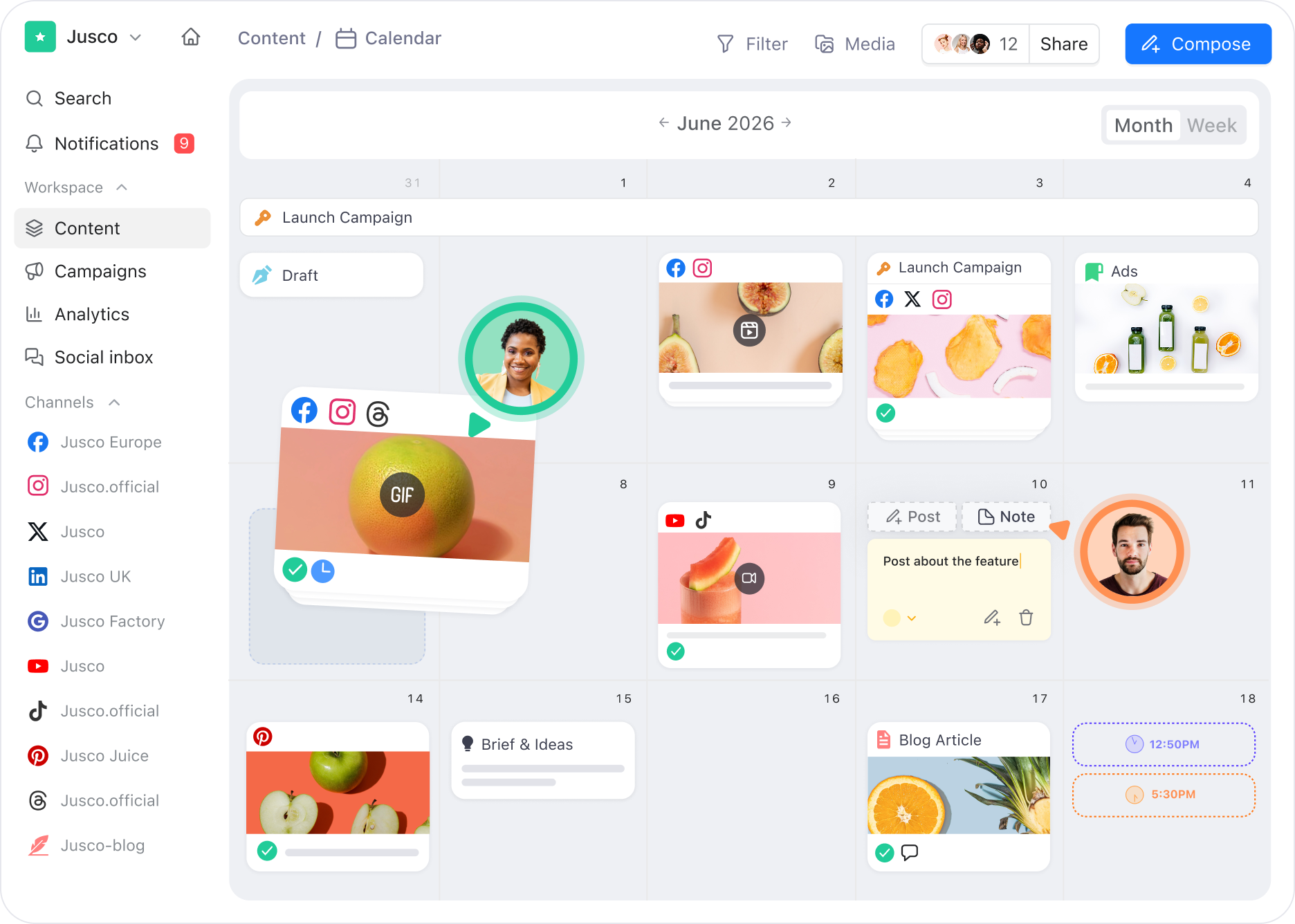
Planable social media calendar with scheduled posts, sticky notes, platform icons, and team collaboration
Each post has a visible status (for example draft, pending review, or approved), making it easy to see exactly where work stands without chasing status updates.
Planable’s main differentiator is replacing fragmented, email-based feedback with a structured, role-based approval workflow designed for clear collaboration and sign-off.
What Planable covers across the content lifecycle
Create
Real-time co-authoring: multiple editors can work in a draft simultaneously, with comments attached directly to the content.
Optional AI assistance for generating or rewriting post copy to accelerate first drafts.
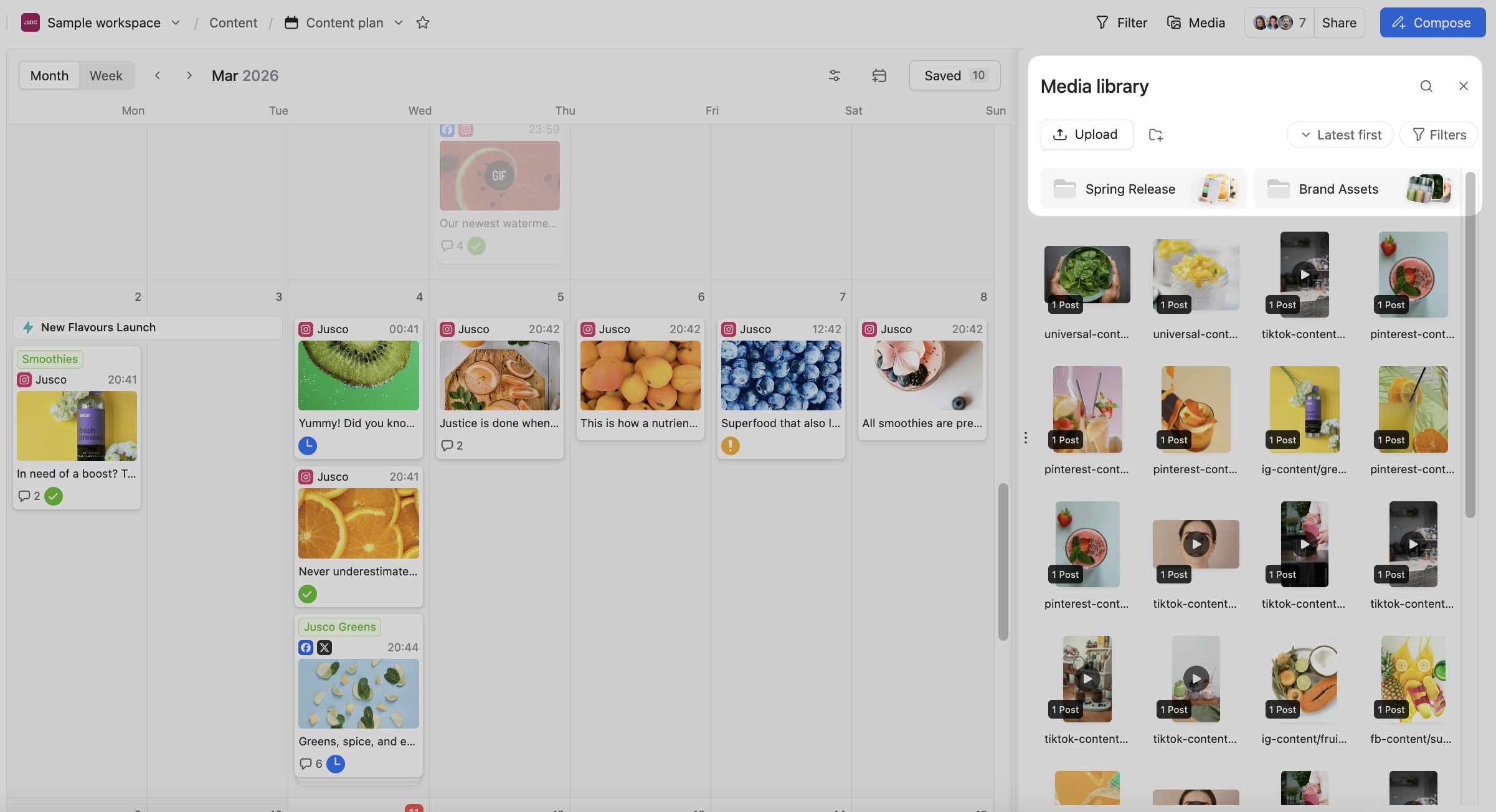
A centralized asset hub (media library) where teams can upload, organize, and reuse images, videos, and other media across workspaces. Assets are available directly in the content creation flow, helping teams maintain brand consistency without digging through local folders or chat threads.
Planable content calendar with media library panel showing folders and social post image thumbnails
Approve
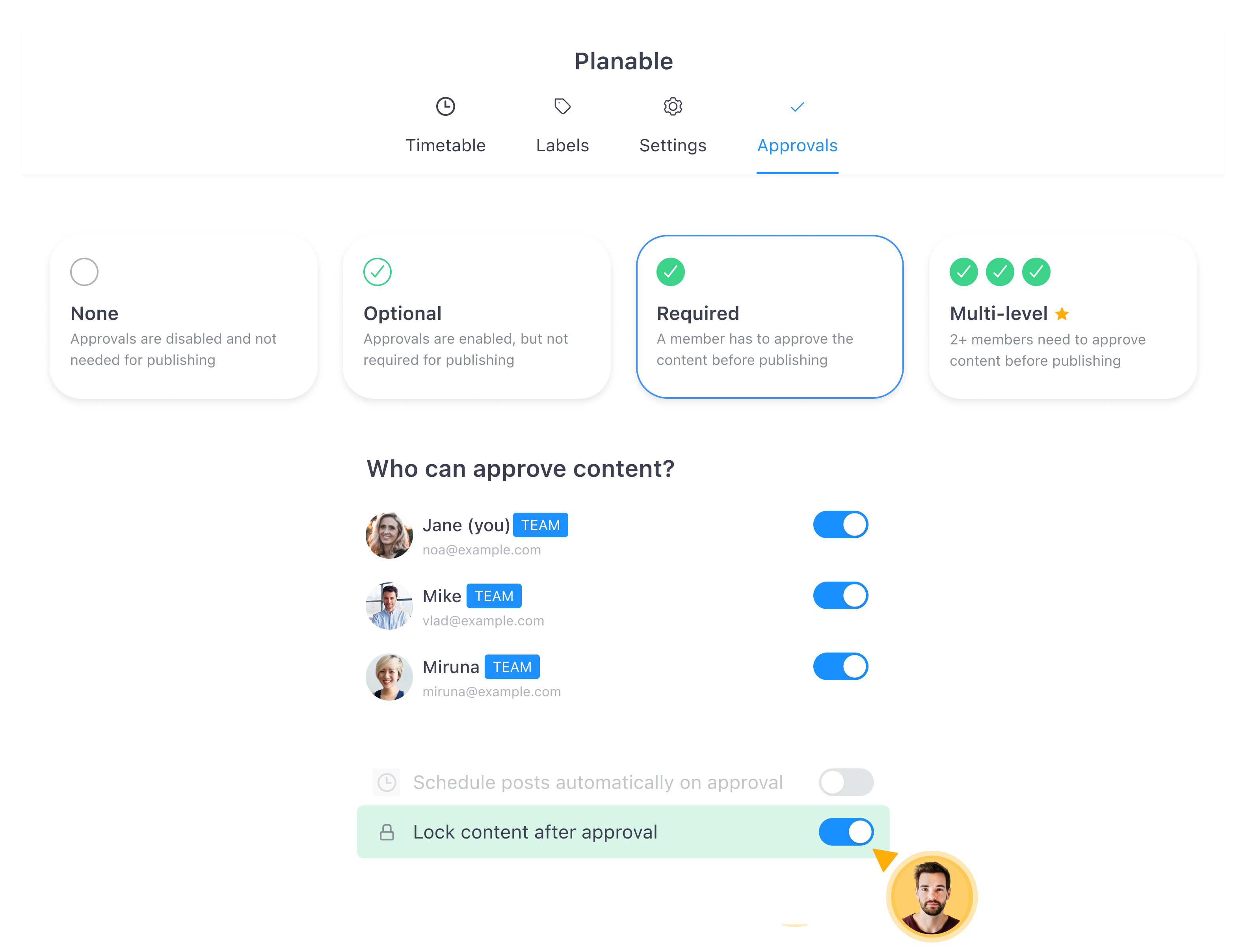
Custom approval workflows, so content can move through one or multiple review levels (instead of getting stuck in email threads).
Internal notes and internal posts for team-only context before content reaches client review.
Planable approval settings with required review, approver toggles, and lock content after approval option
Plan
Visual content calendar with calendar, feed, list, and grid views, useful for spotting gaps, overlaps, and timing conflicts across campaigns.
Labels for filtering and search across content types.
Post templates to standardize recurring formats and speed up production.
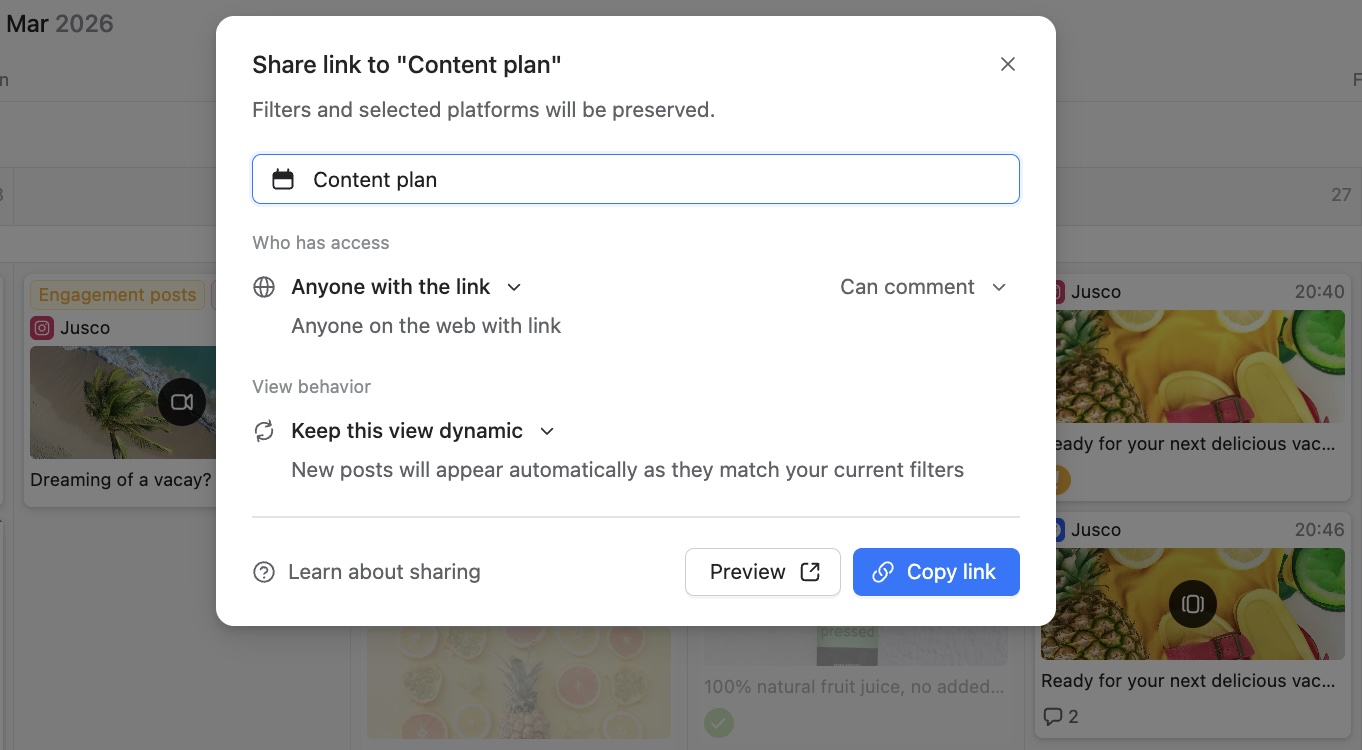
External collaborator access via guest view links. Clients can review without needing a full account.
Planable share link popup with guest access permissions, comment settings, and dynamic view controls
Schedule
Plan your social media posts to publish automatically on major social media platforms: Instagram, Facebook, LinkedIn, Twitter, TikTok, Google My Business, Youtube, Pinterest and Threads.
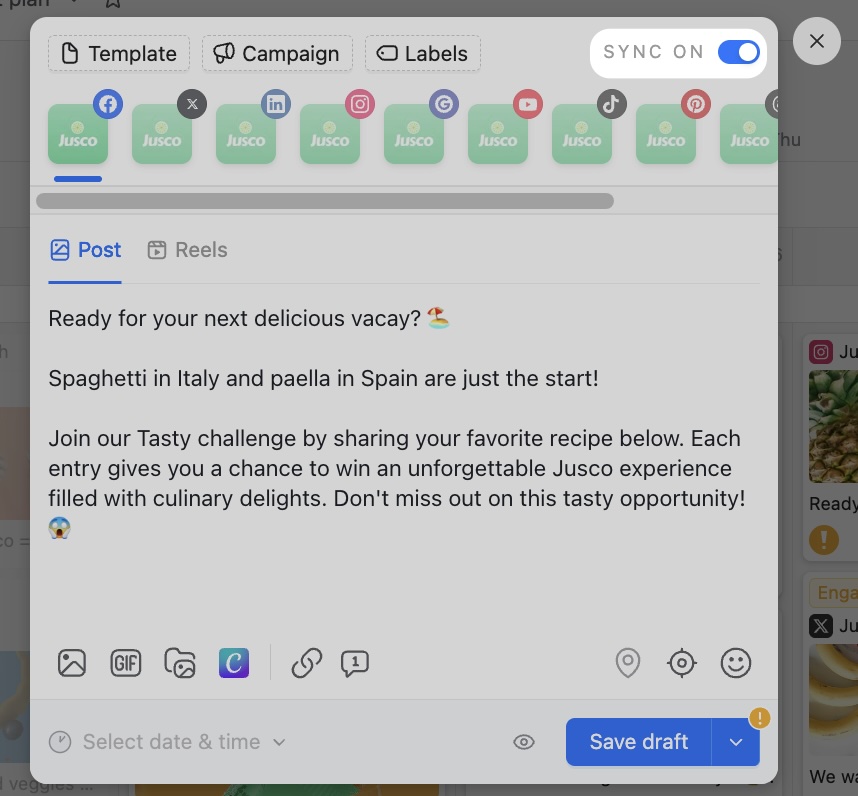
Sync on/off feature for planning the same post across multiple platforms simultaneously.
Planable post composer with sync toggle for publishing the same post across multiple social platforms
Analyze & engage (optional add-ons)
The Social inbox add-on lets marketing teams manage comments and messages across the main social platforms in one place.
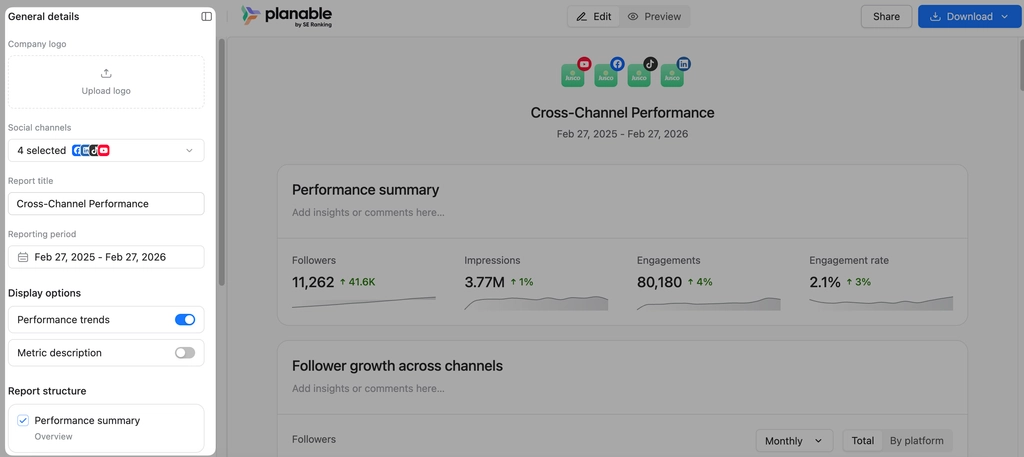
The Analytics add-on provides post-performance reporting with a cross-channel view and client-ready reports that are customizable.
Planable reporting dashboard with editable cross-channel performance metrics for followers and engagement
Integrations & automation
Canva: create design assets in Canva and send them into Planable without leaving your content workflow, so design and publishing stay aligned.
Slack: receive Slack notifications when content is submitted for review, approved, or commented on, keeping everyone in sync without switching tools.
Zapier: connect Planable to 5,000+ apps to automate repetitive tasks, such as triggering actions when posts are approved or scheduled, pushing content data to spreadsheets, or syncing with project management tools.
Planable pricing
Planable offers a free trial for the first 50 posts (no time limit, no credit card), paid plans starting at $33/workspace/month (Basic) and $49/workspace/month (Pro), plus Enterprise custom pricing, with Analytics and Social Inbox as add-ons.
Drawbacks
Planable can help you plan and produce website content, but it doesn’t currently publish directly to common CMS platforms.
Takeaway
Planable is a strong fit for agencies and multi-brand organizations that need a structured feedback and approval process across creators, internal stakeholders, and clients.
2. SocialBee
Best for: social-first marketers and content creators who need AI-assisted scheduling and category-based content organization
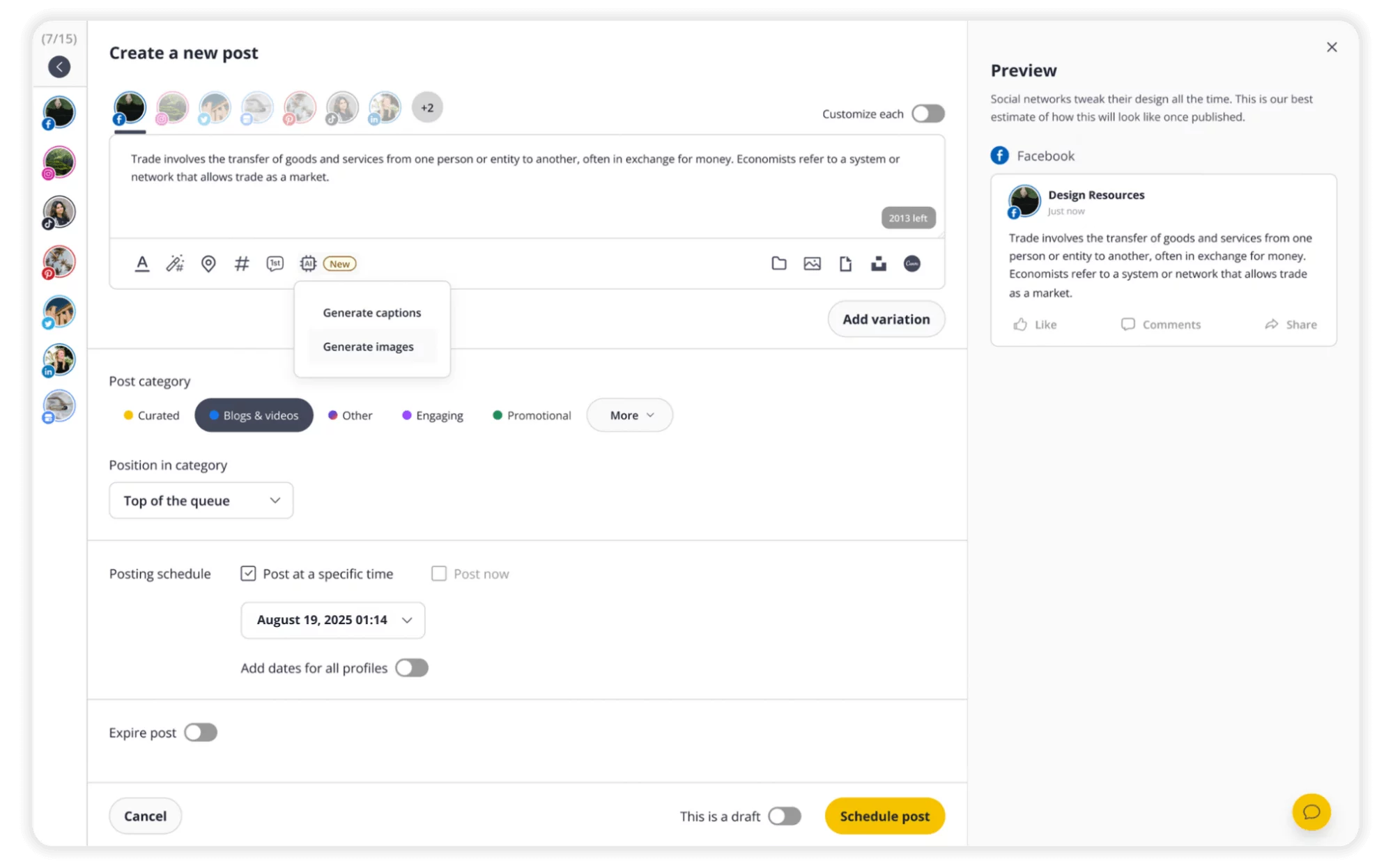
SocialBee post editor with scheduling controls, category options, and Facebook preview panel
SocialBee is an AI-powered social media management platform built around posting consistency and content categorization.
It’s designed for teams and solo marketers who want to maintain a steady publishing cadence without manually rebuilding their queue each week.
SocialBee key features
AI content assistant: Generates post copy and post ideas tailored to brand voice. Useful for filling content gaps quickly.
Category-based scheduling: Content is organized into categories (e.g., promotional, educational, evergreen) and recycled or rotated based on rules.
Visual content calendar: Weekly and monthly overview with platform-specific preview (including Instagram grid view).
Analytics & reporting: Post-performance data including reach, engagement, and audience growth.
SocialBee pricing
SocialBee offers a 14-day free trial. Paid plans start at approximately $24/month (Bootstrap plan) for 1 user, 1 workspace and up to 5 social profiles.
Drawback
SocialBee has a steeper learning curve than simpler social media schedulers, particularly around setting up content categories and recycling rules. New users may need several sessions before the content workflow feels natural.
Takeaway
SocialBee suits social media managers who prioritize posting consistency and want to automate content rotation. Less suited for teams needing structured client approvals or multi-channel content beyond social.
3. Notion
Best for: small teams and individuals who want a flexible workspace for planning and tracking tasks
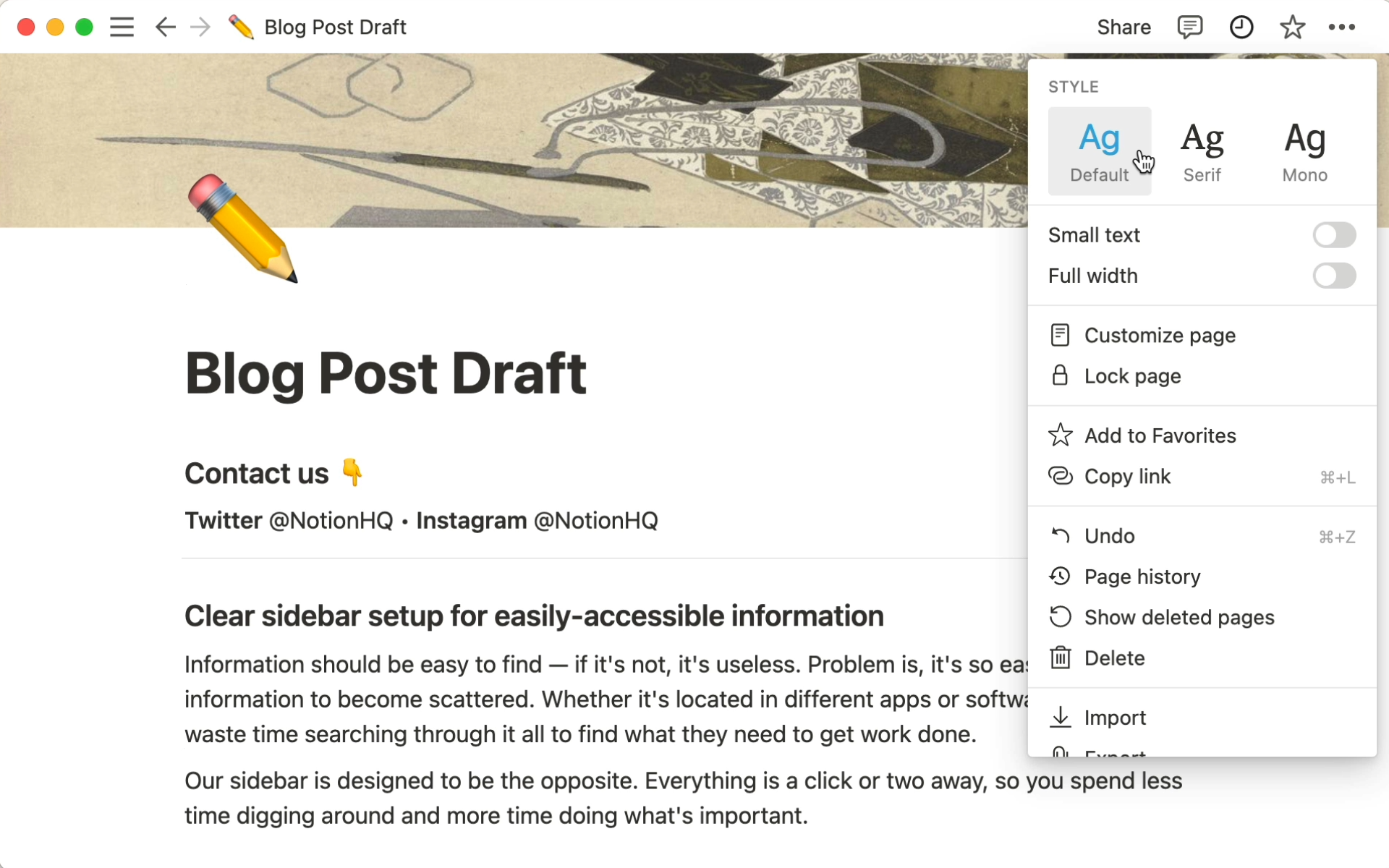
Notion is a general-purpose workspace that teams adapt for content planning. It combines a document editor with a lightweight database, making it useful for content briefs and documentation, editorial calendars, basic asset storage, and task tracking and coordination.
Notion blog post draft page with style menu open and content planning notes for a brief or article
Notion key features
Content calendar: Database views (calendar, table, kanban) for organizing content across social, blog, and video. Supports labels, assignees, deadlines, and status tracking.
Team collaboration: Shared workspace with comments, @mentions, and real-time editing. Useful for brainstorming and keeping references in one place.
Templates: Notion’s template library includes pre-built editorial calendars and content planning setups. Teams can start from a template rather than building from scratch.
Database flexibility: Content can be linked across databases. For example, connecting a blog post entry to a campaign record and a brand asset library.
Notion pricing
Notion has a free plan available for individuals and small teams (under 10 members with limited block history). Paid plans start at $8/user/month (Plus plan).
Drawback
Unlike dedicated content planning and publishing tools, Notion does not publish or schedule content to social channels, blogs, email, or newsletters. Approval workflows require manual workarounds (status fields, comments).
Takeaway
Notion is a viable starting point for small teams that don’t yet need automation or structured approvals. It breaks down at scale (multi-brand agencies or teams with active client review cycles will hit its limits fast).
4. ProofHub
Best for: marketing teams that need structured project management with built-in proofing and approval
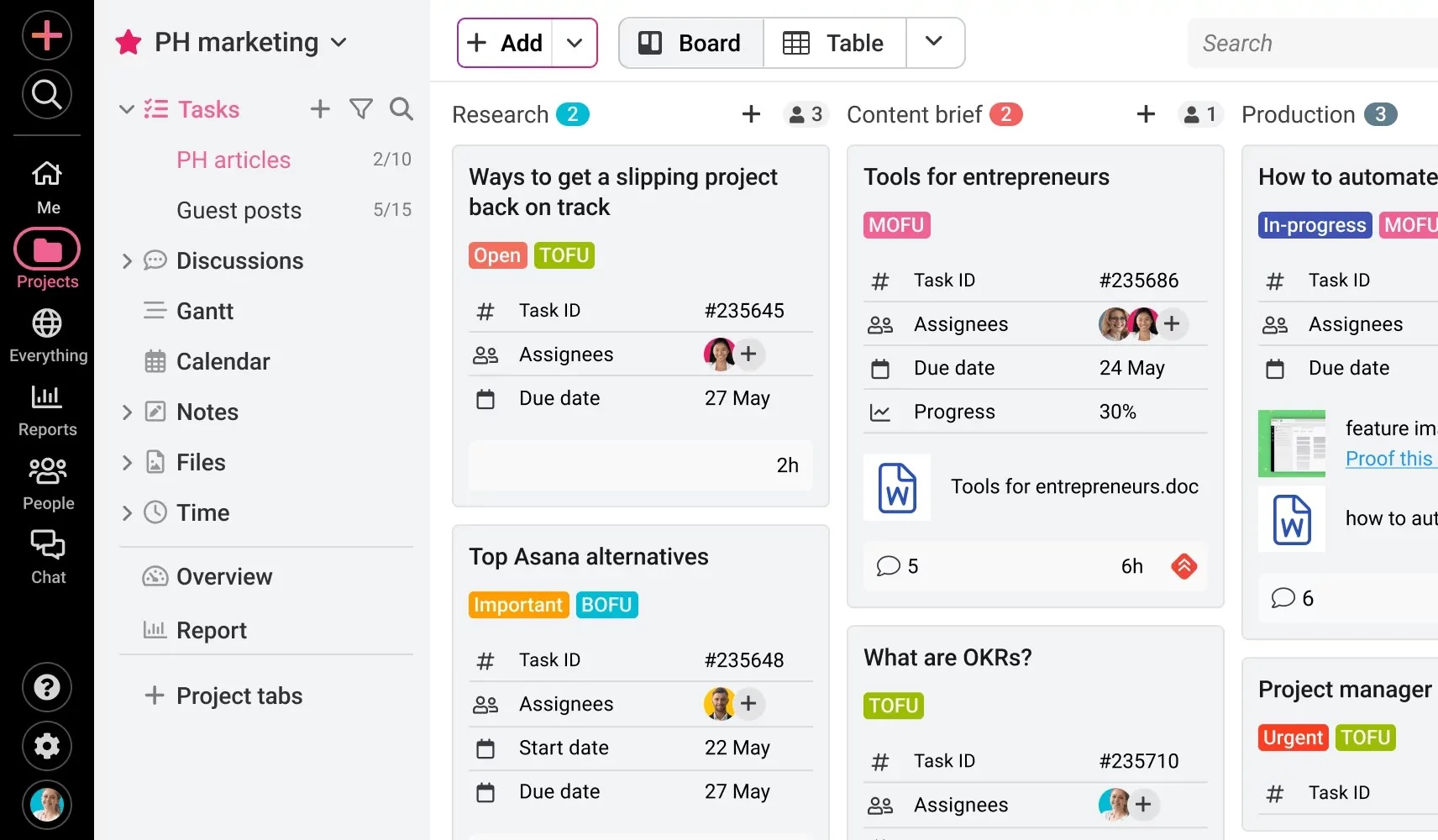
ProofHub is a project management and team collaboration software that helps marketing teams plan, organize, and execute content efficiently.
ProofHub Kanban board for content marketing tasks with columns for research, briefs, and production stages
It combines content calendars, task management, approvals, and collaboration in a single workspace, making campaign management seamless.
ProofHub key features
Content calendar & task tracking: Plan posts, blogs, newsletters, and campaigns on a visual calendar. Set deadlines and reminders.
Collaborative workflows: Assign tasks, comment inline, and track progress across multiple projects in real time.
Approval workflows with built-in proofing: Create multi-level approval processes with built in proofing to streamline content reviews. Ensure nothing goes live without proper sign-off.
File management & notes: Store assets, attach files to tasks, and maintain internal notes. Keep all resources in one organized place.
Multi-project coordination: Centralized dashboard for managing multiple campaigns, teams, or departments simultaneously.
ProofHub pricing
ProofHub uses flat-rate pricing, not per-user. Plans start at approximately $45/month (Essential) and $89/month (Ultimate Control) billed annually, with unlimited users on both plans.
Drawback
ProofHub does not generate or schedule content, it is a planning and approval tool only. Teams will still need separate tools for social publishing or CMS management.
Takeaway
ProofHub is a strong choice for marketing teams that need rigorous project control and structured approval without paying per seat. Its flat-rate pricing is a meaningful advantage for agencies with large or growing teams.
5. Teamwork
Best for: marketing agencies and teams working with freelancers who need client-facing project management, time tracking, and billing
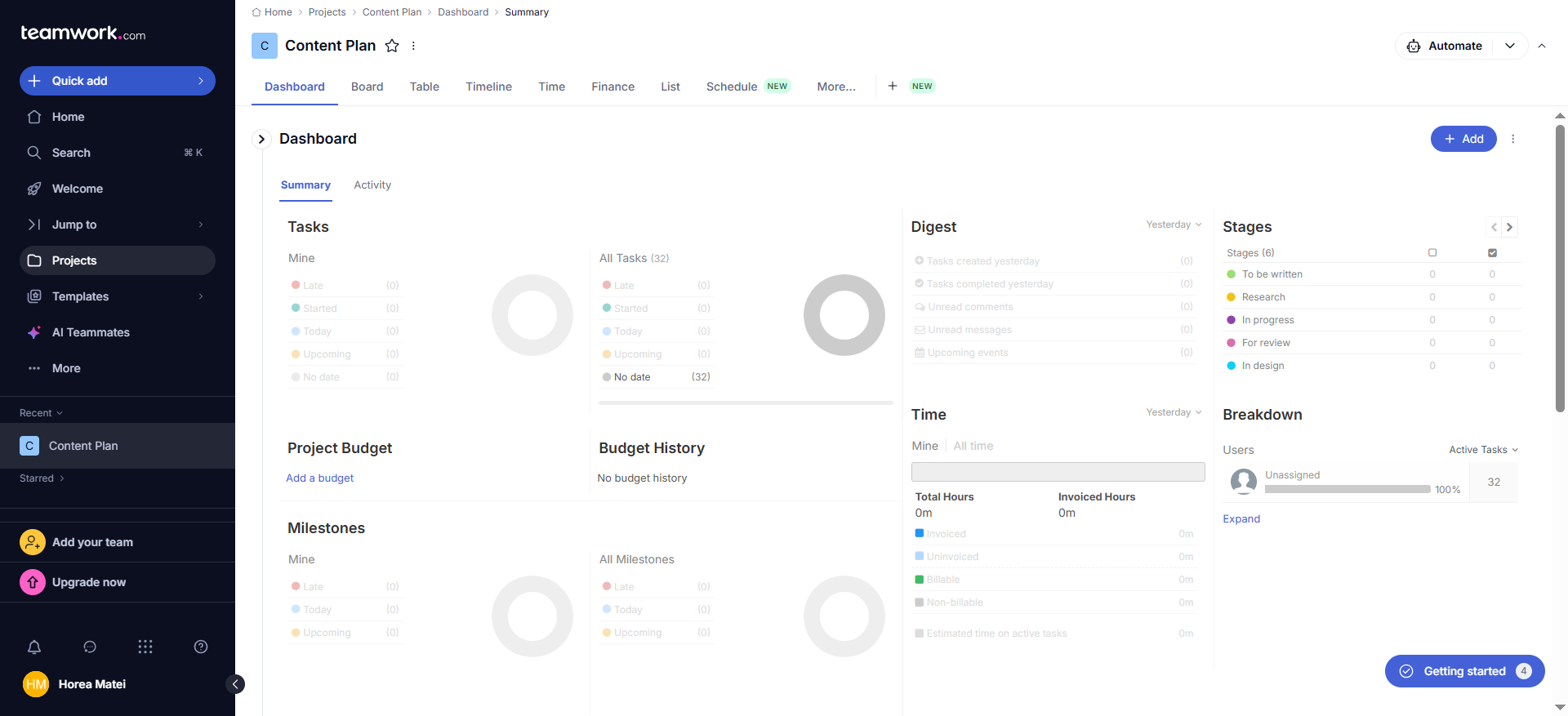
Teamwork is a project management platform oriented toward client services. It shares core functionality with task management tools like Asana or Trello but differentiates with built-in time tracking, invoicing, and client visibility controls.
Teamwork project dashboard with task summaries, budget history, milestones, stages, and time tracking
Teamwork key features
Customizable task boards: Boards include statuses, budgets, time logged, sub-tasks, and dependencies. Pre-built templates available for common content workflows.
Time tracking & invoicing: Built-in time tracker linked to tasks. Teams can generate invoices directly from logged hours.
Client access & permissions: Clients can be given limited access to view project progress without seeing internal notes or costs. Useful for transparent agency-client relationships.
Teamwork pricing
Free plan for up to 5 users. Paid plans start at €10.99/user/month (Deliver). Higher tiers unlock resource management, invoicing, and more advanced reporting.
Drawback
Teamwork is a project management tool. It has no content-specific features like post scheduling, social analytics, or content preview. It manages the work around content, not the content itself.
Takeaway
Teamwork is the right fit for agencies that need to manage client projects, track billable time, and coordinate freelancers, all in one place. Is not a replacement for a dedicated content planning or social media management tool.
6. CoSchedule
Best for: progress tracking for small marketing teams
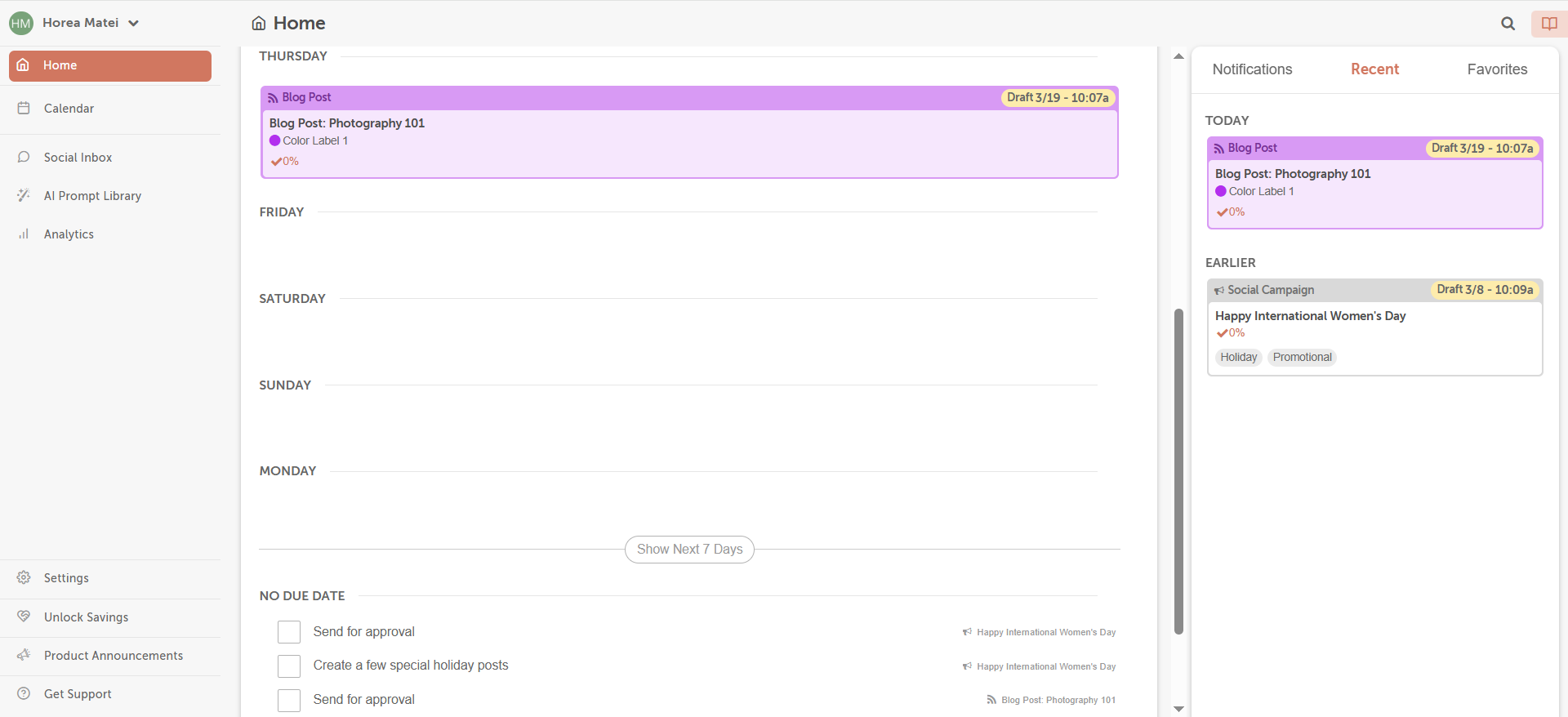
It’s core product is the Marketing Calendar, a visual hub for planning and tracking all marketing activity in one place.
CoSchedule home dashboard with blog post timeline, checklist items, and recent notifications sidebar
CoSchedule key features
Editorial calendar: Color-coded calendar covering blog posts, social media, newsletters, and other campaigns. All content types visible in a single view.
Social scheduling: Publish directly to major social platforms from within the calendar. Requeue feature allows automatic rescheduling of top-performing posts.
Analytics & reports: Basic engagement reporting on social campaigns. Useful for lightweight performance reviews or reporting to management.
CoSchedule pricing
CoSchedule offers four paid plans starting at $19/user/month, plus a free-forever plan for individuals that includes 1 social profile and up to 15 scheduled posts. Higher tiers scale up to custom-priced suites for larger marketing teams.
Drawback
CoSchedule’s feature set beyond the calendar is limited compared to full social media management or project management platforms. It doesn’t support complex approval workflows or multi-brand separation. Not well-suited for agencies managing multiple client accounts.
Takeaway
CoSchedule works for small in-house marketing teams that need a clear, visual overview of their editorial activity. If your team has grown beyond basic scheduling or needs client approval flows, you’ll outgrow it quickly.
7. Brafton
Best for: content marketing teams and agencies that need end-to-end campaign management and ROI tracking
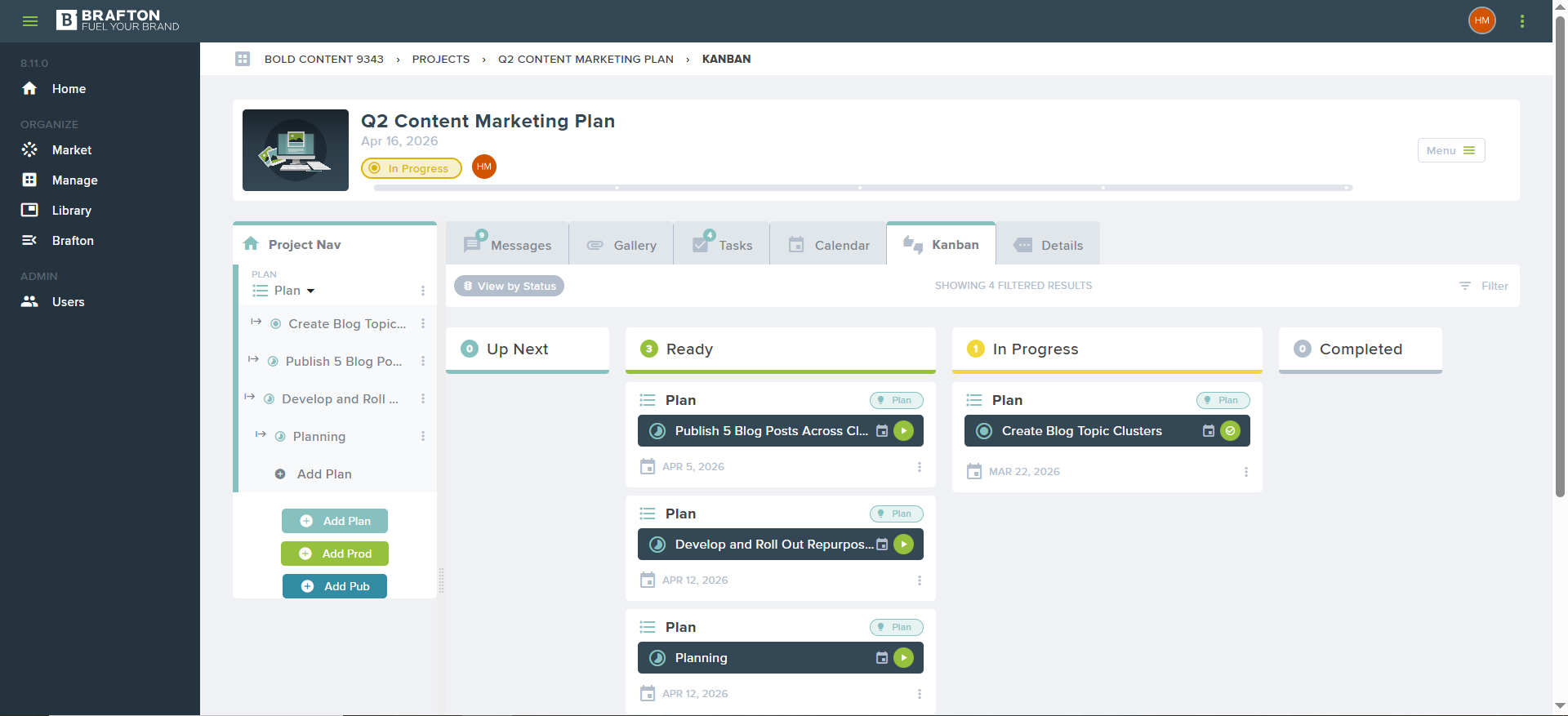
The Brafton Platform was built by content marketers for content marketers. It covers the full content marketing workflow, from project launch and task assignment through to performance measurement.
Brafton Kanban board for a content marketing plan with tasks grouped by up next, ready, and in progress
Brafton key features
Project planning & workflow management: Launch projects, define tasks, assign ownership, and set timelines. Customizable to fit different content types and team structures.
Project tracking with approvals: Visual status tracking as content moves through the workflow. Projects can be organized by campaign to maintain strategic alignment.
Content library: Built-in digital asset management; completed content is stored, tagged, and searchable. Reduces time lost hunting for past deliverables.
Performance dashboards: Native integrations with GA4, Google Search Console, and Semrush. KPI tracking without leaving the platform.
Brafton pricing
Brafton doesn’t publish public pricing for its platform. It’s custom-quoted based on your needs, and no fixed plans or tiers are listed anywhere. To get a quote, you’d need to contact them directly through their website.
Drawback
Outside of content marketing use cases, Brafton is less flexible than general project management tools like Asana or Notion. Teams that need to manage non-content work alongside content operations may find it limiting.
Takeaway
Brafton is a strong fit for dedicated content marketing teams that want an end-to-end workflow and measurable outcomes. Its SEO integrations make it especially practical for organizations where organic search performance is a core KPI and reporting focus.
8. Brandwatch
Best for: enterprise teams and brands that need deep social listening, audience intelligence, and data-driven content strategy
Brandwatch is an enterprise-grade social intelligence platform. Its primary strength is listening and analysis: tracking online conversations about your brand, competitors, and industry to inform what content to create and when.
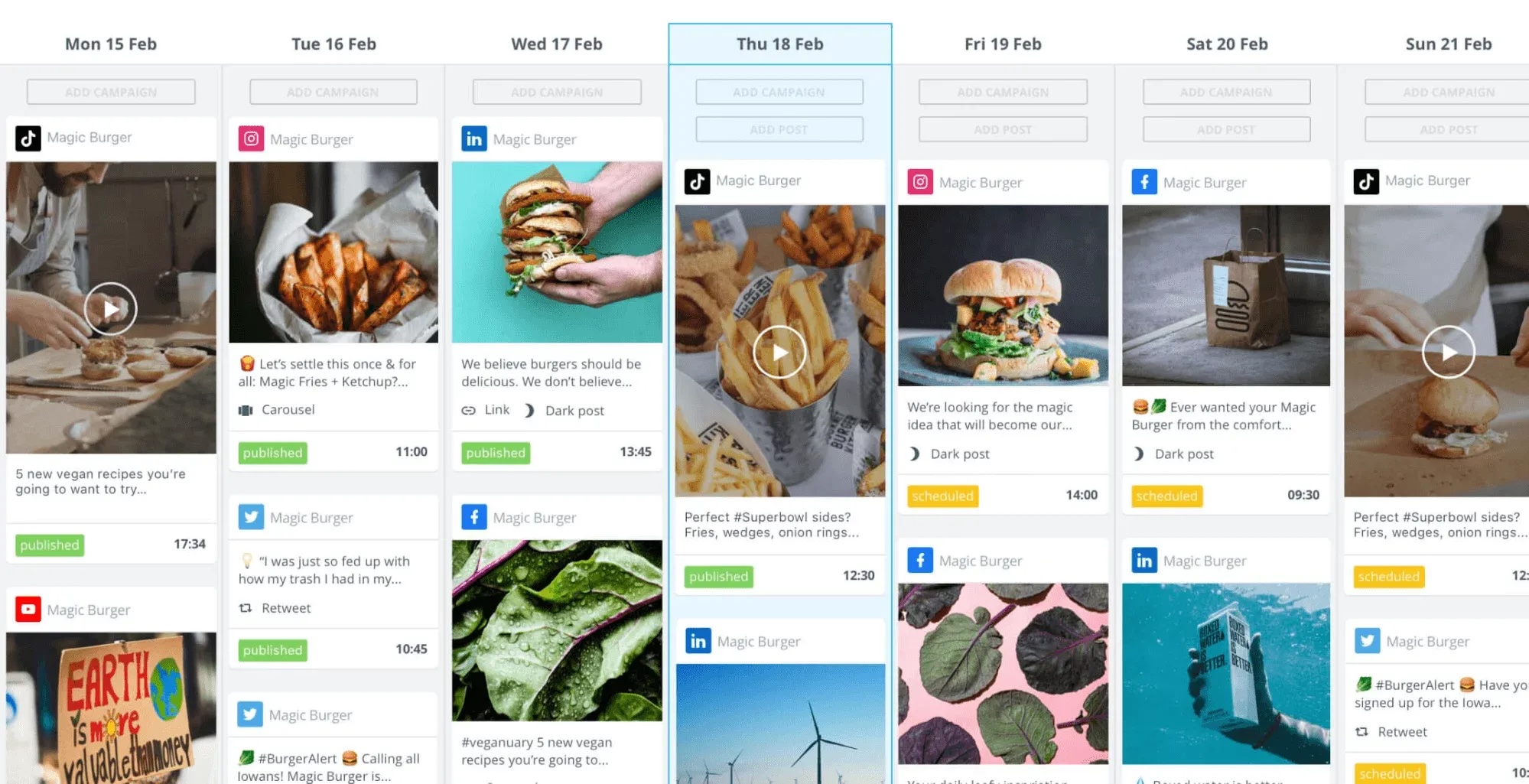
Brandwatch’s weekly calendar showing scheduled posts, platform icons, content previews, and publish times for campaigns
Social publishing and calendar features are available but secondary to its intelligence capabilities.
Brandwatch key features
Social listening: Track brand mentions, competitor conversations, and industry topics across social platforms, blogs, and forums. Identifies content opportunities grounded in real audience behavior.
Audience intelligence: Segment audiences by interest, demographics, and behavior. Useful for brands that need to tailor content across multiple segments or regions.
Social media calendar: Plan, preview, and schedule paid and organic social campaigns. Combined with asset library to streamline content production.
Brandwatch pricing
Brandwatch uses custom pricing across three solution packs: Influencer, Social Media, and Consumer Intelligence. No public pricing is listed; you need to contact it directly for quotes.
Drawback
The platform’s three-pack structure can be confusing. Features are spread across different products rather than unified in one interface. Teams that only need scheduling or basic analytics may be paying for capabilities they don’t use. It is not an approval or content creation tool.
Takeaway
Brandwatch is an enterprise tool for brands where audience intelligence and data-driven content strategy are priorities. If your team’s primary need is scheduling or production management, the investment is hard to justify. If you need to understand your audience before you plan content, it’s among the best options available.
9. Content Snare
Best for: Agencies and teams that regularly need to collect content, assets, or approvals from multiple external stakeholders
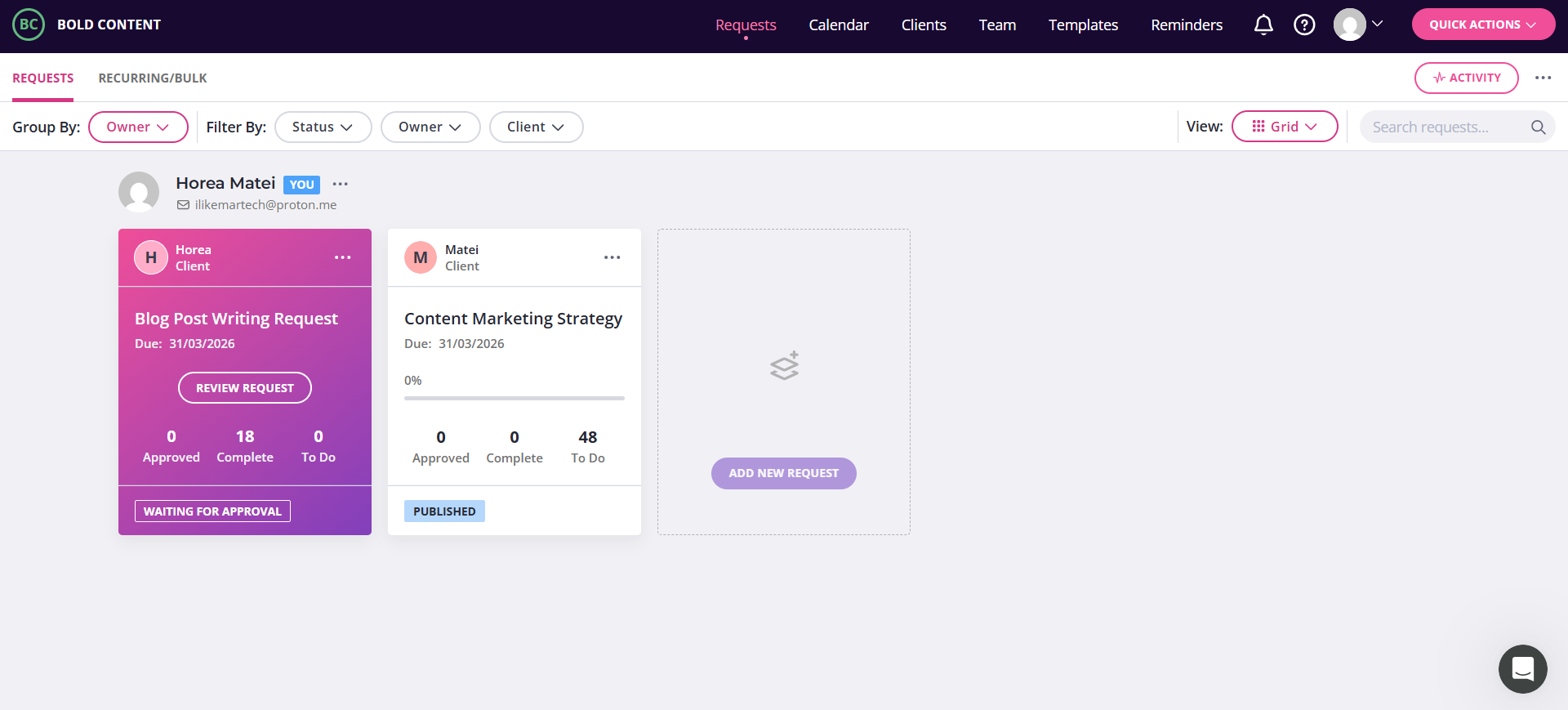
Content Snare is a content marketing tool that helps teams gather content and documents from people outside their organization.
Content Snare’s request dashboard showing blog writing request, content strategy task, status counts, and approval stage
It solves a specific, painful problem (chasing clients or contributors for materials) with a structured request-and-reminder system. It is not a full content planning platform.
Content Snare key features
Content request workflows: Create structured requests for content or documents, set deadlines, and send automatic reminders to contributors. Works like a guided intake form rather than an email chain.
Approval & collaboration: Single-click approval or rejection for submitted content. Comment threads keep feedback organized.
Automatic reminders: Configurable reminder sequences that follow up with contributors automatically and reduces manual chasing for teams managing many client accounts.
Content Snare pricing
Content Snare has four paid plans starting at $35/month (Basic) for two users and basic integrations.
Drawback
Besides gathering and approving content, Content Snare doesn’t provide advanced content planning features.
Takeaway
Content Snare is highly effective at one thing: getting content from people who are slow or disorganized about providing it. For agencies that spend significant time chasing clients for materials, it removes significant friction. Not a standalone solution.
10. SE Ranking
Best for: SEO-driven content teams and agencies that need to plan content around search visibility, keyword data, and AI search performance
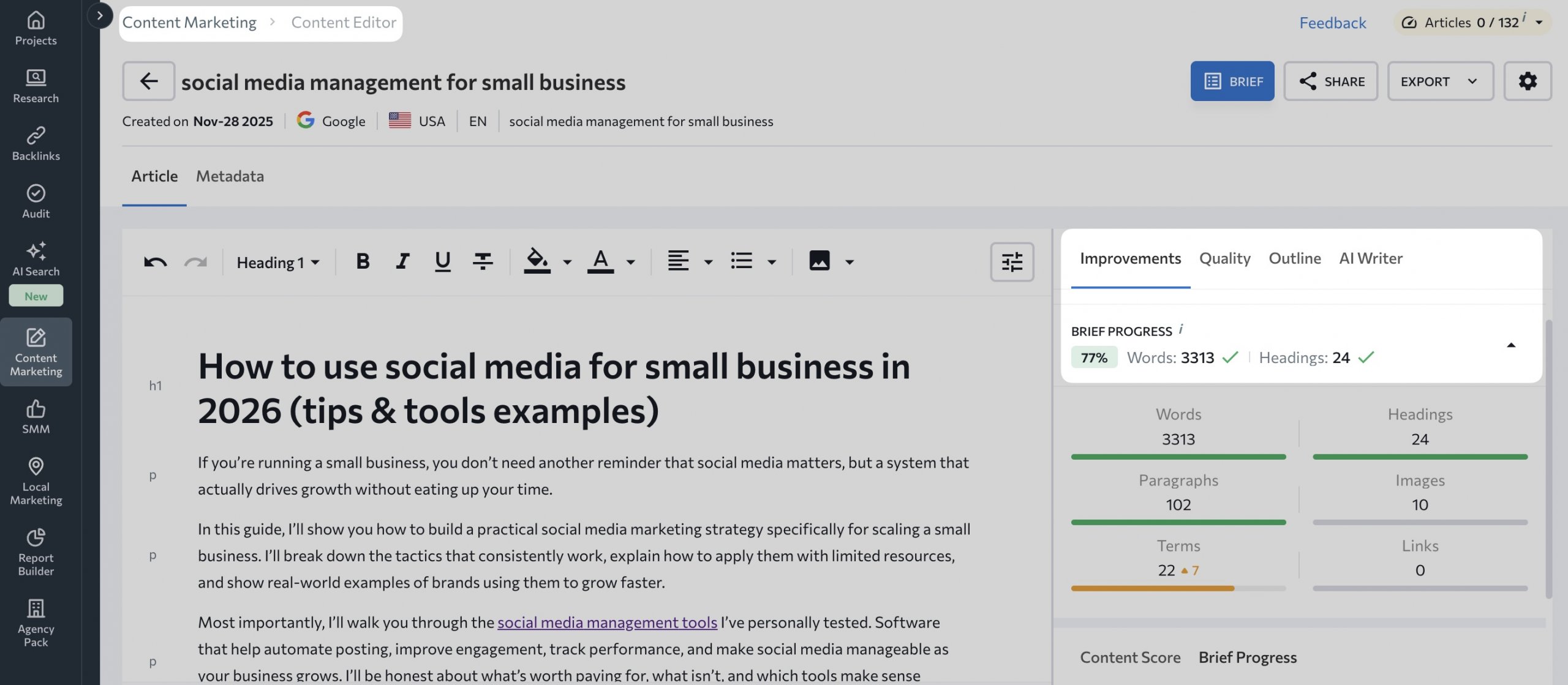
SE Ranking is primarily an all-in-one SEO platform, but its Content Marketing module makes it relevant for content planning. The module includes a Content Editor, Content Idea Finder, Content Planner, and AI Writer, covering the research-to-publish workflow without switching tools.
SE Ranking content editor with article draft, SEO brief progress, word count, and optimization suggestions
Where SE Ranking stands out is the connection between SEO data and content decisions. Keyword research, competitor analysis, and content optimization all feed into each other within the same platform.
SE Ranking key features
AI search visibility tracking: Monitors how your content performs in AI-generated search results.
Keyword research & content ideation: Built-in keyword research tool connects search demand data directly to content planning. Helps teams prioritize topics by traffic potential.
Content editor: AI-assisted content editor with SEO recommendations, target keyword density, readability, and competitor comparison built in.
Rank tracking: Track keyword rankings daily across search engines and locations. Useful for multi-location brands monitoring regional search performance.
Competitor analysis: Analyze competitor content gaps and keyword overlap to identify opportunities.
SE Ranking pricing
SE Ranking offers tiered plans starting at approximately €87.20/month (Essential) for 10 projects and 1 manager. Pricing scales with the number of keywords tracked and users. A 14-day free trial is available.
Drawback
Because SE Ranking is organized around SEO workflows, content planning functions more like an add-on than the primary experience.
Takeaway
SE Ranking is the right choice for content teams where SEO performance is the primary KPI. For multi-location brands, the localized rank tracking is a specific advantage. Less suited for social-first teams or those primarily managing approval workflows.
Features and benefits of content planning software
The most useful content planning tools share a few structural qualities that separate them from basic schedulers or spreadsheet-based workflows.
1) Centralize everything in one place
When content spans multiple formats and channels, centralization prevents drift and duplication. A strong content planner keeps blog drafts, social posts, creative briefs, and supporting assets in one system, reducing version-control problems caused by email threads and scattered shared drives.
Best for: multi-channel teams, multi-brand orgs, agencies, high collaboration environments.
2) Make the pipeline visible
Visualization helps teams spot gaps before they become missed publish dates. Calendar views, feed/list views, and color-coded tags make it easier to see:
where coverage is thin
where content clusters too tightly
whether the mix across channels is balanced
Outcome: fewer surprises and smoother planning.
3) Enforce consistency as teams scale
Consistency becomes harder to maintain as team size and channel count grow. Good planning tools enforce structure through:
shared templates
brand guidelines (or “source of truth” references)
approval steps and clear ownership
Outcome: cohesive messaging even when multiple people publish.
4) Reduce manual work with automation
Efficiency comes from removing repeated steps. Look for features like:
scheduling automation
bulk publishing
repost / recurring content options
Outcome: lower operational load for high-volume or always-on content programs.
How to choose the right content planning tool
The right content planning tool depends on where your current process breaks down.
Use the criteria below to match your workflow to the best-fit option.
Team structure & approval complexity
If content moves through multiple reviewers (legal, brand, client, executive), a purpose-built approval software matters more than a general scheduler.
Planable fits social and multi-channel teams that need post-level collaboration, approvals, and scheduling.
For solo operators or small teams with simple review cycles, CoSchedule or SocialBee can cover the essentials without added workflow overhead.
Number of accounts and content types
Tool fit changes fast as you add channels, formats, and accounts.
If you manage blogs alongside social, email, and newsletters, prioritize tools built for multi-format planning, Planable is stronger here than social-only schedulers.
If you mainly publish social content at high volume, SocialBee is often a better fit for social-only throughput and category-based scheduling.
For agencies managing 10+ client accounts, prioritize workspace organization and bulk workflow support. Planable and SocialBee scale better for this than a general workspace tool like Notion.
SEO and performance integration
If organic search is a core KPI, planning needs to connect directly to keyword and performance context.
SE Ranking is the most SEO-native option on this list, built around the link between keyword research and content decisions (with rank tracking, a content editor, and competitor analysis).
Brafton fits content marketing teams that also want integrated performance reporting (including GA4 and Search Console) within a broader content workflow.
Client access & content collection
Agencies sharing content for review before publishing typically need guest access or a dedicated client review portal.
If clients need to review and approve content before publishing, choose tools with guest access or client review options. Planable supports client review without requiring a full client account.
If your bottleneck is upstream (collecting content and assets from clients) Content Snare is purpose-built for structured collection and reminders, and often solves the problem more directly than a full planning platform.
Project management & billing
If your workflow includes the service-delivery layer (not just the content), you may need a project platform first.
Teamwork is a fit when you need freelancer coordination, time tracking, and client invoicing. It’s not a content planning tool, but it manages the work around content in ways dedicated planners typically don’t.
Budget & pricing model
Higher-priced tools often justify cost through analytics depth, reporting, or listening/engagement features.
The key question is whether those capabilities match your actual content workflow or whether a simpler, lower-cost tool covers what your team will realistically use.
FAQs
What are content planning tools?
Content planning tools help teams plan, organize, and execute content across channels while keeping work aligned with marketing strategy and business goals. They make it easier to publish consistently and maintain a clear view of what’s planned, in progress, and ready to go live.
Which content planning tool is best for agencies?
For agencies and content-heavy teams, Planable is a strong choice because it’s built around structured approval workflows that align clients, internal teams, and creators in one review process. This reduces reliance on email threads and makes sign-off clearer and faster.
Can I schedule posts to publish automatically?
Planable, SocialBee, and CoSchedule support automatic scheduling to major social platforms.
Horea is a software reviewer and tester, content writer, and tech geek. He loves to fiddle with MarTech solutions to find what each software is best for and help you decide which one might be your best fit. His content is allergic to fluff and eats research for breakfast. If you’re on the fence about whether you should commit to a particular platform, Horea probably already wrote about it.







 Create
 Schedule
 Plan
Plan Engage
 Collaborate
 Analyze
 Approve